Samsung releases One UI 9 Beta, get it on your Galaxy S26 now! – Samsung has officially opened the doors to its next-generation mobile software experience with the release of the One UI 9 Beta for the new Samsung Galaxy S26 lineup. The update gives Galaxy users an early chance to explore Samsung’s newest interface redesign, smarter AI-powered tools, deeper customization features, and performance improvements months before the stable version arrives globally.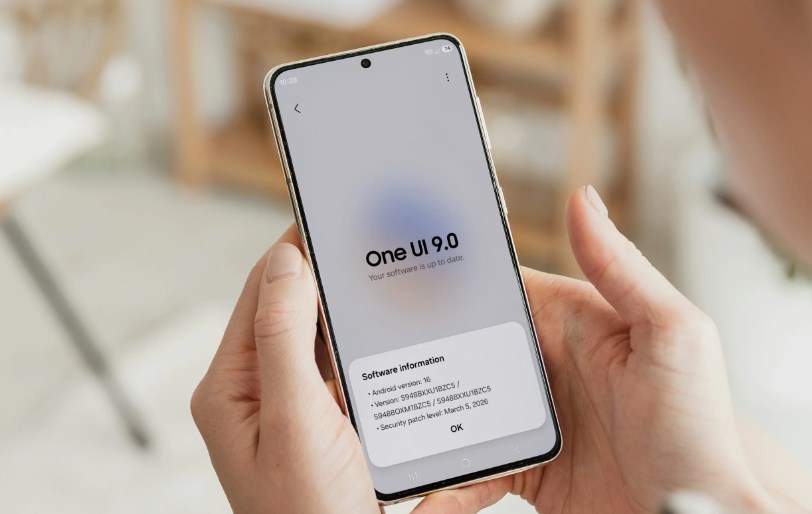
For Samsung fans, beta season has become one of the most exciting parts of the Android release cycle. It offers a preview of what’s coming next while allowing users to help shape the software through feedback and testing. This year’s One UI 9 Beta appears to be one of Samsung’s most ambitious updates yet, bringing a cleaner design language and a heavier focus on personalization and on-device intelligence. The beta is currently rolling out to select users in supported regions, and owners of the Galaxy S26 series can enroll right away through the Samsung Members app.
A Fresh Look for One UI
Samsung’s One UI software has steadily evolved over the years from a simple Android skin into one of the most polished mobile operating systems available. With One UI 9, Samsung is refining that formula rather than reinventing it completely. At first glance, users will notice smoother animations, cleaner menus, and more refined transitions throughout the system. Samsung has focused heavily on making the interface feel lighter and faster while still keeping the familiar One UI identity intact.
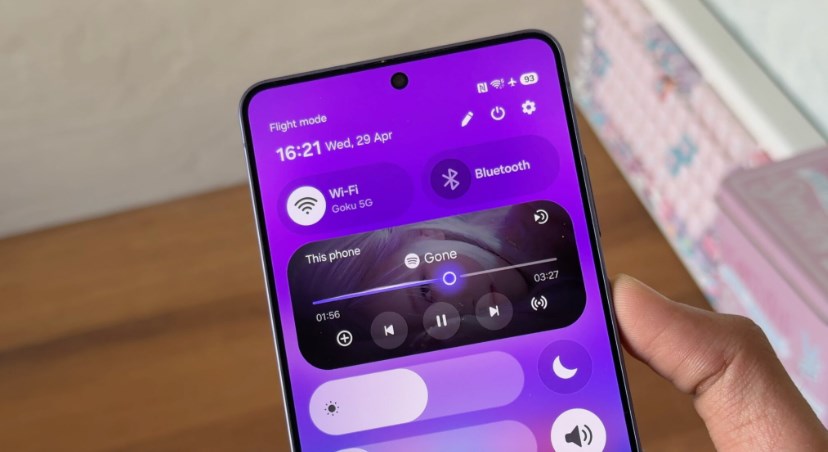
Widgets have received another major overhaul, with more adaptive sizing options and interactive elements that allow users to complete simple tasks without opening apps. The lock screen customization system has also expanded, giving users more control over fonts, notification layouts, wallpapers, and shortcuts. Samsung appears to be leaning further into minimalism this year. Many menus now feature softer transparency effects, redesigned toggles, and updated iconography that creates a more modern appearance across the entire system. The company has also introduced dynamic themes that automatically adjust interface colors based on wallpapers, lighting conditions, and time of day. It creates a more personalized visual experience that feels unique to each user.
AI Features Take Center Stage
Artificial intelligence is clearly one of the biggest priorities in One UI 9. Samsung is integrating more AI-powered tools directly into the operating system to make everyday tasks faster and more intuitive. One of the standout additions is an upgraded AI writing assistant that can summarize messages, rewrite emails, adjust tone, and generate quick replies across supported apps. The feature works directly within Samsung Keyboard, making it accessible almost everywhere on the device.
Samsung is also expanding its live translation capabilities. Real-time call translation has improved with faster processing and more natural speech output. The feature now supports additional languages and works more seamlessly inside messaging apps. Photo editing is getting smarter as well. The Gallery app includes enhanced AI object removal, automatic photo enhancement, and intelligent scene recognition that can improve lighting and detail with a single tap.
Samsung’s voice assistant experience has also been upgraded. Voice commands are reportedly faster and more context-aware, allowing users to perform multiple actions in a single request. For example, users can ask the phone to summarize notifications, schedule events, and send messages all at once. Most importantly, Samsung says many of these AI features rely on on-device processing rather than cloud-based systems. That means better privacy and faster performance for users. Samsung releases One UI 9 Beta
Better Battery Optimization
Battery life improvements are another major focus in One UI 9 Beta. Samsung has introduced a more advanced adaptive battery management system that studies user habits and intelligently limits background activity for rarely used apps. The software can now predict charging routines more accurately and optimize charging speeds accordingly. Samsung claims the new system reduces unnecessary battery strain, which may help preserve long-term battery health.
Thermal management has reportedly improved too. Early testers say the Galaxy S26 devices remain cooler during gaming sessions and intensive multitasking compared to previous One UI versions. Samsung has also improved RAM management, helping apps stay active longer without slowing down the device. Multitasking feels smoother, especially when switching between demanding applications.
Security and Privacy Upgrades
Samsung continues to emphasize security as a core part of the Galaxy experience. One UI 9 introduces several new privacy protections designed to give users greater transparency and control. The new Privacy Dashboard offers a more detailed breakdown of how apps access sensitive data such as location, microphone, camera, and contacts. Users can instantly revoke permissions or receive alerts when apps behave suspiciously.
Samsung Knox security has also been expanded with additional protection layers for banking apps, passwords, and encrypted files. A new feature called Secure Activity Monitoring reportedly detects unusual behavior patterns and warns users about potential security threats in real time. Samsung is also strengthening anti-theft protection with enhanced remote locking features and smarter recovery tools in case devices are lost or stolen.
Camera Improvements for the Galaxy S26
The One UI 9 Beta also introduces several camera upgrades specifically optimized for the Samsung Galaxy S26 Ultra and its siblings. Night photography appears to be one of the biggest beneficiaries. Samsung has improved image processing algorithms to capture brighter and sharper low-light photos while reducing noise and motion blur. Video recording receives enhancements too, including smoother stabilization, better HDR processing, and improved audio separation during recording. Samsung releases One UI 9 Beta
Samsung’s AI scene optimizer has become more advanced, automatically detecting environments and adjusting camera settings in real time for more natural-looking shots. rofessional users may appreciate the updated Pro Mode interface, which now offers easier manual adjustments and more precise control over exposure and focus settings.
Smarter Ecosystem Features
Samsung’s ecosystem integration is becoming increasingly important, and One UI 9 strengthens the connection between Galaxy devices. Users with Samsung tablets, laptops, earbuds, and smartwatches will notice improved continuity features. Switching between devices feels faster and more seamless, especially for calls, notifications, and file sharing.
Samsung DeX has received refinements that make the desktop experience smoother when connecting the phone to monitors or PCs. Quick Share also becomes more reliable with faster transfer speeds and expanded compatibility across Android and Windows devices. The update further improves integration with Samsung SmartThings, allowing users to control smart home devices more naturally through routines and voice commands.
How to Get the One UI 9 Beta
Users who own a Galaxy S26 series device can join the beta program through the Samsung Members application. Once enrolled, the beta update becomes available through the phone’s software update section. Because beta software is still under development, users should expect occasional bugs, app compatibility issues, and performance inconsistencies.
Samsung usually limits beta access to certain regions during the early rollout phase before expanding availability worldwide. More Galaxy devices are expected to receive beta access in the coming weeks. Users are also encouraged to back up their devices before installing the update to avoid potential data loss. Samsung releases One UI 9 Beta
Early Impressions Look Promising
Initial reactions from beta testers have been largely positive. Many users are praising the smoother animations, refined design, and improved responsiveness across the system. The AI-powered tools are receiving particular attention, especially the smarter writing assistance and enhanced photo editing capabilities. Battery optimization and thermal improvements are also being highlighted as meaningful upgrades for daily use.
Of course, as with any beta release, some bugs and glitches remain. A few testers have reported minor app crashes and inconsistent battery readings, though these issues are expected during early testing phases. Samsung will likely continue refining the software through multiple beta updates before the stable public release arrives later this year.
Samsung’s Vision for the Future
With One UI 9, Samsung is showing that smartphone software is becoming increasingly centered around intelligence, personalization, and ecosystem connectivity. Rather than focusing only on visual changes, Samsung appears determined to create a smarter and more adaptive user experience that actively helps users throughout the day.
The One UI 9 Beta gives an early glimpse into that future. From AI-powered productivity tools to improved privacy systems and smoother performance, the update represents another major step forward for Samsung’s Galaxy ecosystem. For Galaxy S26 owners eager to experience the latest features ahead of everyone else, the beta program offers a chance to explore the future of Samsung software right now. Samsung releases One UI 9 Beta
About the Author