Review Turtle Beach Vulcan II XP – If you’ve been keeping an eye on PC gaming hardware over the last few years, you might remember the original ROCCAT Vulcan. It was easily one of the most visually striking mechanical keyboards to ever grace a desk setup, thanks to its floating keycaps, ultra-thin top plate, and RGB lighting that looked like it belonged in a high-end cyber-lounge.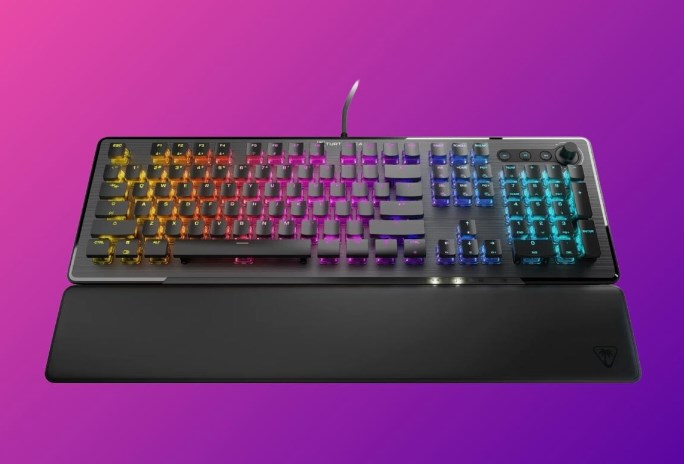
Fast forward to today, and ROCCAT has officially folded under the umbrella of its long-time parent company, Turtle Beach. The iconic design didn’t disappear, though. Instead, it received a fresh coat of paint, a few key performance upgrades, and a brand-new name: the Turtle Beach Vulcan II XP.
Priced around $149 to $179 depending on regional sales and configurations, the Vulcan II XP lands smack in the middle of the hyper-competitive mid-to-high-end gaming keyboard market. But does it actually hold up under daily typing marathons, intense late-night gaming sessions, and the rigorous demands of custom keyboard enthusiasts?
Here is an honest, hands-on dive into every detail of the Turtle Beach Vulcan II XP—from its striking aesthetic and switch performance to its software quirks and everyday usability.
1. First Impressions and Design: Aesthetics Done Right
Unboxing the Turtle Beach Vulcan II XP is an experience in itself. The moment you pull it out of the box, it’s immediately obvious that this isn’t your average black-box mechanical keyboard.
The Floating Keycap Silhouette
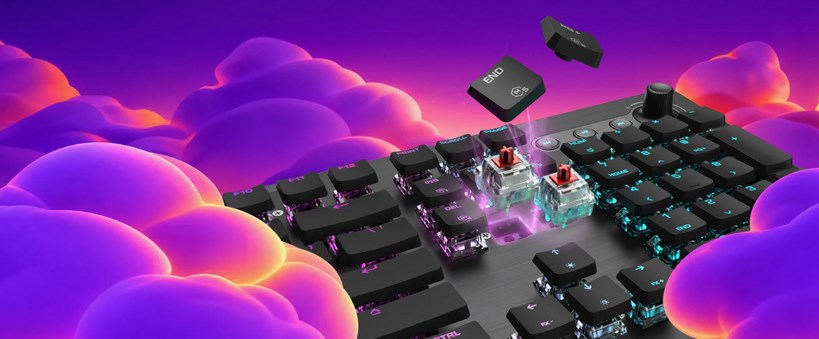
The defining hallmark of the Vulcan series has always been its low-profile, floating keycaps set against an exposed top plate. On the Vulcan II XP, that aesthetic remains as striking as ever. The keycaps are truncated—thinner than traditional OEM or Cherry profile keycaps—leaving the clear, transparent switch housings entirely exposed.
When the RGB lighting kicks in, the effect is hypnotic. Rather than lighting bleeding through subtle gaps between keycaps, the light fills the transparent switch housings, casting a radiant glow across the entire board. If you love clean, ambient RGB that genuinely brightens up your setup without looking tacky, this board is hard to top.
       [ Floating Keycap Design ]
             |__________|
        [ Transparent Switch ]  <-- Clear RGB Diffusion
  =================================  <-- Anodized Aluminum Top Plate
  =================================  <-- High-Density ABS Bottom Shell
Build Quality & Desk Presence
The top surface is covered by a sturdy, anodized aluminum plate with a brushed texture that feels premium under your hands. It provides structural integrity to the entire chassis, ensuring there is almost zero deck flex even if you happen to be a heavy-handed typist.
Underneath, the bottom housing is high-grade ABS plastic. While a full-aluminum chassis would have been nice at this price point, keeping the base plastic keeps the weight down and allows for internal dampening acoustic tweaks. Rubber feet line the bottom, and two dual-stage fold-out feet give you three distinct typing angles.
2. Key Switches & Performance: TITAN II Optical Switches
The real heart of any mechanical keyboard is what sits under the caps. The Vulcan II XP moves away from traditional mechanical contacts in favor of Turtle Beach’s proprietary TITAN II Optical Switches.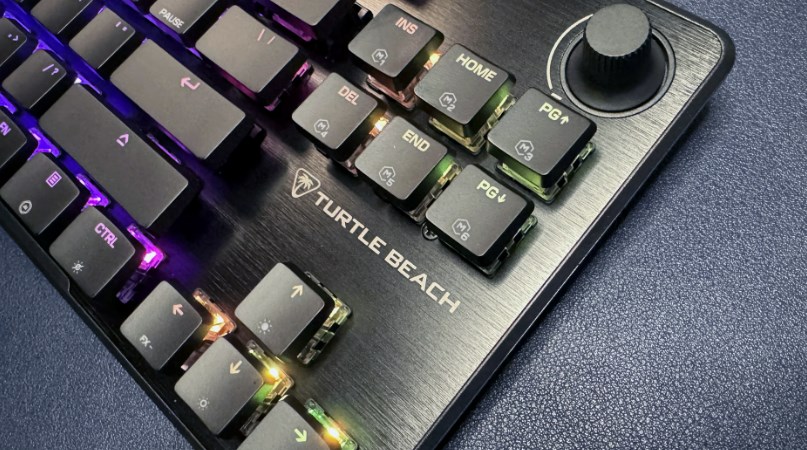
How TITAN II Optical Switches Work
Traditional mechanical switches rely on metal contacts touching each other to register a keystroke. Over time, these contacts wear out, leading to double-typing issues or degraded feel.
Optical switches, by contrast, use a beam of light. When you push a key down, the switch stem interrupts or clears an infrared light beam inside the switch, signaling the computer instantly.
-
Speed: Actuation occurs at the speed of light with virtually zero debouncing delay.
-
Durability: Rated for an astonishing 100 million keystrokes, effectively outlasting standard mechanical switches by double.
Linear (Red) vs. Tactile (Brown) Options
The Vulcan II XP comes in two switch variants:
-
TITAN II Optical Linear (Red): Smooth, light, and fast. Actuates at 1.4mm with an operating force of 45g. Ideal for fast-paced FPS gaming where swift double-taps matter.
-
TITAN II Optical Tactile (Brown): Feature a soft bump near the top of the keypress. Actuates at 1.8mm with a 45g operating force. Better for typists who prefer physical feedback to prevent typos.
In daily testing with the Linear Red version, the keystrokes feel exceptionally smooth right out of the box. The switches come pre-lubricated from the factory, which eliminates the scratchiness that often plagues stock gaming keyboards. Review Turtle Beach Vulcan II XP
3. The Typing & Acoustic Experience
A keyboard can look gorgeous on paper, but if typing on it feels like clacking away on a hollow plastic toy, it’s a non-starter. Fortunately, Turtle Beach paid extra attention to acoustics on this revision.
Acoustics & Sound Profile
The original ROCCAT Vulcan suffered from a metallic “pinging” sound when keys were bottomed out hard. The Vulcan II XP addresses this head-on by integrating sound-dampening foam layers inside the casing.
-
Spacebar & Large Keys: Stabilizers are lubricated, greatly reducing rattle on the Spacebar, Enter, Shift, and Backspace keys.
-
Sound Profile: It leans toward a pleasant, moderate-pitched “clack” rather than a hollow “thock.” It’s far quieter than traditional clicky blue switches, making it totally usable in a shared office environment or on stream without blowing out your microphone.
Keycap Ergonomics: A Double-Edged Sword
The flat, thin profile of the keycaps looks stunning, but it requires a slight adjustment period. Because the key surfaces are narrower and flatter than traditional sculptured caps, your fingers have less surface area to rest on. If you are transitioning from a standard mechanical keyboard, you might experience a few accidental keystrokes during your first day or two. However, once muscle memory adapts, typing feels snappy and effortlessly fluid.
4. Features, Connectivity & Media Controls
The Vulcan II XP doesn’t just look pretty; it’s feature-packed for power users and gamers alike.
Dedicated Media Controls & Dial
In the top right corner sits a set of dedicated media control buttons alongside a textured volume dial.
-
The dial has subtle tactile detents, allowing you to fine-tune system volume or quickly mute audio with a simple click.
-
Right next to it are dedicated track play/pause and skip buttons.
Having an analog knob on your desktop is one of those quality-of-life additions you never realize you need until you have it—it’s far more convenient than hunting for Function keys mid-game.
Smart Key LEDs (Dual-LED Indicators)
One of the cooler innovations in the Vulcan II XP is its Smart Keys. Certain keys feature dual LEDs. The main LED handles the lighting theme, while a secondary LED light at the bottom of the key cap lights up when a secondary function is active.
For instance, if you press the Fn layer, secondary functions (like profile switching or macro keys) illuminate in a contrasting color, showing you exactly what each key does on the fly without making you guess or check software.
Detachable Palm Rest
Included in the box is a full-sized, soft rubberized palm rest that magnetically latches to the bottom of the keyboard. While it isn’t memory foam or leatherette, the flexible rubber material is comfortable, easy to wipe clean, and provides crucial wrist elevation that reduces strain during long typing sessions. Review Turtle Beach Vulcan II XP
5. Software & Personalization: Turtle Beach Swarm II
Hardware is only half the battle. To unlock the full capabilities of the Vulcan II XP, you need to install Turtle Beach Swarm II (the updated version of ROCCAT’s legacy Swarm software).
Key Customization Features:
-
AIMO Lighting Engine: Turtle Beach’s signature lighting system doesn’t just cycle rainbow waves. It dynamically reacts to your typing cadence and system events, creating fluid color shifts across all connected Turtle Beach peripherals.
-
Easy-Shift[+] Technology: Derived from ROCCAT’s heritage, Easy-Shift[+] lets you designate a key (usually Caps Lock) as a secondary modifier. Holding it down unlocks a complete secondary layer of custom keybindings, hotkeys, or complex macros.
-
On-Board Profiles: The keyboard features onboard storage capable of saving up to 5 complete hardware profiles. You can take your custom lighting themes and macros anywhere without needing the software running in the background.
6. How It Performs in Real-World Gaming
To truly test the Turtle Beach Vulcan II XP, we put it through its paces across several distinct game genres:
First-Person Shooters (Valorant, Counter-Strike 2, Apex Legends)
This is where the TITAN II Optical Linear switches shine brightest. Counter-strafing in CS2 and executing rapid movement tech in Apex felt crisp and effortless. The 1.4mm actuation point strikes a sweet balance—shallow enough to feel immediate, but deep enough that resting your fingers on the WASD keys won’t trigger unwanted inputs.
Real-Time Strategy & MMOs (World of Warcraft, StarCraft II)
For keybind-heavy games, the Easy-Shift[+] function is a lifesaver. Being able to access 20+ additional macro commands with one modifier key right under your left hand drastically speeds up reaction times without requiring you to buy a bloated, oversized macro board.
Daily Work & Productivity
Writing long-form reports, coding, or churning out emails on the Vulcan II XP feels surprisingly comfortable once you adjust to the keycaps. The switches don’t tire out your fingers, and the acoustic dampening prevents long typing sessions from sounding like a jackhammer in your workspace. Review Turtle Beach Vulcan II XP
7. Comparative Breakdown: How Does It Stack Up?
To see where the Vulcan II XP stands in today’s hardware ecosystem, let’s compare it against two of its primary rivals: the Razer BlackWidow V4 and the SteelSeries Apex Pro.
| Feature / Spec | Turtle Beach Vulcan II XP | Razer BlackWidow V4 | SteelSeries Apex Pro |
| Switch Type | TITAN II Optical | Razer Mechanical | OmniPoint 2.0 Adjustable |
| Switch Lifespan | 100 Million Clicks | 100 Million Clicks | 100 Million Clicks |
| Top Plate Material | Anodized Aluminum | Aluminum Alloy | Aircraft-Grade Aluminum |
| Keycap Profile | Low-Profile / Floating | Standard OEM | Standard OEM |
| RGB Aesthetics | Full Exposure / Ambient | Standard Backlit | Standard Backlit |
| Wrist Rest | Included (Magnetic) | Included (Plush) | Included (Magnetic) |
| Media Dial | Yes (Textured Dial) | Yes (Multi-Function) | Yes (OLED + Roller) |
| On-Board Memory | 5 Profiles | 5 Profiles | 5 Profiles |
Key Takeaways from the Comparison:
-
Choose the Vulcan II XP if: You want unmatched RGB diffusion, low-profile aesthetics, smooth optical switches out-of-the-box, and intuitive dual-layer keybinding.
-
Choose the Razer BlackWidow V4 if: You prefer standard OEM keycaps, dedicated tactile macro keys on the left side, and a extra plush wrist rest.
-
Choose the SteelSeries Apex Pro if: You require adjustable per-key actuation points for hyper-specific competitive gaming needs, though at a higher price tag.
8. The Pros and Cons
Before making your buying decision, here is a quick summary of what makes the Vulcan II XP shine, along with a few areas where it falls slightly short:
What We Loved (The Pros)
-
Unbeatable Visuals: The floating keycaps paired with clear switch housings create the best RGB lighting display on the market today.
-
Lightning-Fast Switches: TITAN II Optical switches feel incredibly smooth, snappy, and are built to last a lifetime.
-
Thoughtful Smart Keys: Secondary LEDs on keys make navigating layout layers simple and intuitive.
-
Solid Media Suite: The textured volume knob and discrete playback buttons feel tactile and premium.
-
Improved Sound: Internal acoustic dampening effectively tames hollow ringing and stabilizer rattle.
What Could Be Better (The Cons)
-
Keycap Adjustment Period: The flatter, thinner keycap profile might take a few days to get used to if you’re coming from traditional mechanical caps.
-
ABS Plastic Keycaps: At this price point, standard ABS caps can eventually develop shine over time; high-durability PBT keycaps would have been a welcome upgrade.
-
Software Learning Curve: Swarm II is feature-rich, but the user interface can feel a bit cluttered compared to minimalist software alternatives.
9. Final Verdict: Is the Turtle Beach Vulcan II XP Worth It?
The Turtle Beach Vulcan II XP successfully carries forward the legacy of the ROCCAT Vulcan lineage while addressing almost all the minor complaints of its predecessors. By combining the lightning-fast performance of TITAN II Optical Switches with enhanced internal dampening, smart dual-LED indicators, and an iconic aluminum floating-keycap design, Turtle Beach has delivered a mechanical gaming keyboard that excels at both form and function. It isn’t just a gimmick board that relies on pretty RGB lights; it’s a high-performance, durable, and satisfying peripheral that holds its ground during intense gaming and heavy daily typing alike.
About the Author