Airport Security Just Got Faster: How to Add Your Driver’s License and Passport to Your Phone – Traveling can be exciting, but getting through airport security is rarely the most enjoyable part of the experience. Between checking flight information, organizing luggage, preparing boarding passes, and making sure important documents are ready, even a short trip can involve plenty of preparation. One small mistake, such as leaving a driver’s license or passport in the wrong bag, can create unnecessary stress.
Fortunately, digital technology is making some parts of the airport experience easier. Travelers can now add supported identification documents, including driver’s licenses and passports, to their smartphones. Instead of always reaching for a physical wallet or searching through a travel document organizer, eligible passengers can use digital identification features to present certain credentials directly from their phones. Airport Security Just Got Faster
Apple Wallet, Google Wallet, and other digital identity services are helping make this transition possible. Depending on the country, device, and participating airport, digital identification can be used at selected security checkpoints and other supported locations.
However, there is an important distinction between carrying a digital ID and having permission to travel without physical documents. Not every airport accepts mobile identification, and international travel requirements can be different from domestic security procedures. Understanding how these features work can help travelers enjoy their convenience without encountering unexpected problems.
How to Add Your Driver’s License to Apple Wallet
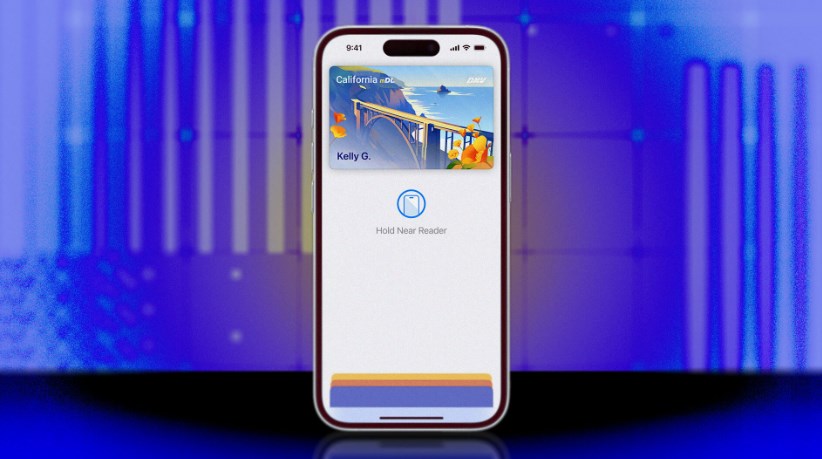
For iPhone users in the United States, Apple Wallet offers a convenient way to store eligible driver’s licenses and state identification cards. Once approved, the digital ID can be presented at participating TSA checkpoints and supported businesses.
Getting started is relatively straightforward:
-
Open the Wallet app on your iPhone.
-
Tap the plus (+) button in the upper-right corner.
-
Select Driver’s License or ID Cards.
-
Choose your participating state or territory.
-
Follow the instructions to scan the front and back of your physical license.
-
Complete the identity verification process, which may involve taking a selfie and performing facial movements.
-
Submit the information for approval by the issuing authority.
Once approved, your driver’s license will appear in Apple Wallet. You can also add it to a compatible Apple Watch if you want another convenient way to present your identification. There are some device requirements to consider. Apple generally requires an iPhone 8 or newer, an updated operating system, Face ID or Touch ID, and an Apple Account with two-factor authentication enabled. Availability also depends on whether the issuing state participates in the program. Airport Security Just Got Faster
How to Add Your Passport to Apple Wallet
Apple has introduced another useful option for people who want digital identification without adding a traditional driver’s license. The company’s Digital ID feature allows eligible users to create a digital identity using information stored in a U.S. passport. The setup process involves a few additional verification steps because passports contain sensitive identity information.
To create a Digital ID:
-
Open Apple Wallet on your iPhone.
-
Tap the plus (+) button.
-
Select Driver’s License or ID Cards.
-
Choose Digital ID.
-
Scan the photograph page of your U.S. passport.
-
Hold your iPhone near the passport to read its embedded security chip.
-
Complete the required selfie and identity verification steps.
After Apple completes the verification process, your Digital ID will appear in Wallet. This feature requires an iPhone 11 or newer running iOS 26.1 or later, or a compatible Apple Watch Series 6 or newer running watchOS 26.1 or later. Users must also have an eligible, unexpired U.S. passport. However, there is one major limitation: Apple’s Digital ID is not a replacement for a physical passport. It can be used for identity verification at participating U.S. TSA checkpoints for domestic travel, but it cannot replace a passport when traveling internationally or crossing national borders. Airport Security Just Got Faster
Android Users Can Store Digital Identification in Google Wallet
Apple is not the only company working to make digital identification more accessible. Android users can take advantage of Google Wallet, which supports eligible driver’s licenses, state identification cards, and passport-based ID passes. The process varies depending on the type of identification and the country where the document was issued. Airport Security Just Got Faster
For an eligible driver’s license, users generally need to open Google Wallet, select the option to add an ID, choose their participating state, and follow the verification instructions. The process may require scanning the physical identification document and completing additional identity checks. Google also supports creating an ID pass using information from an eligible passport. This gives travelers another way to keep important identification details accessible through their smartphones. To create a passport-based ID pass, users can follow these general steps:
-
Open Google Wallet on an eligible Android device.
-
Select the option to add an ID pass.
-
Choose the passport identification option.
-
Scan the passport’s required information.
-
Follow the instructions to complete verification.
-
Review and confirm the information before saving the digital ID.
Google Wallet requires compatible Android hardware and security settings. Passport-based ID passes currently support eligible documents from regions including the United States, United Kingdom, Singapore, Taiwan, and Brazil. Importantly, Google’s ID pass is not an official replacement for a physical passport. Travelers should continue carrying their original documents whenever required.
How to Use Your Digital ID at Airport Security
Once everything is configured, presenting a digital ID at an eligible airport checkpoint is relatively simple. For Apple Wallet users, the process involves double-clicking the iPhone’s side button or Home button, selecting the appropriate Digital ID, and holding the device near the identity reader. The phone may request Face ID or Touch ID authentication before sharing the requested information.
Google Wallet users can similarly present their identification through compatible NFC readers or QR-code systems, depending on the checkpoint. The important part is that travelers remain in control of the information being shared. Rather than automatically transmitting every detail stored on an identification document, supported digital identity systems allow users to review and authorize the requested information.
Some participating TSA checkpoints also use facial comparison technology to help verify a traveler’s identity. This can make the process more convenient by reducing the need to manually handle physical identification documents. However, digital ID acceptance is not universal. Travelers should check airport signage and confirm that their particular checkpoint supports the feature before relying on it. TSA also advises passengers to carry acceptable physical identification because officers may request it even when a digital option is available.
Security and Privacy: Is It Safe to Store Your ID on a Phone?
Putting sensitive identification information on a smartphone naturally raises questions about privacy and security. After all, driver’s licenses and passports contain personal details that should never fall into the wrong hands. Fortunately, Apple and Google have incorporated several security protections into their digital identity systems. Apple Wallet uses encryption and biometric authentication to protect stored identification information. Users must authorize presentations using Face ID or Touch ID, helping prevent someone else from casually accessing their digital documents. Airport Security Just Got Faster
Google Wallet also uses encrypted storage and device authentication. Users can review the information being requested before sharing it. If an Android phone is lost or stolen, Google provides options for remotely removing sensitive information through device-management features. These protections make digital identification an attractive alternative to carrying information in ordinary photographs or screenshots. A picture of a driver’s license saved in a phone’s gallery does not offer the same verification and security features as an approved digital ID.
Nevertheless, no digital system is completely risk-free. Keeping smartphones updated, using strong screen locks, enabling account security features, and avoiding suspicious applications remain important habits. Travelers should also remember that storing identification digitally does not eliminate the need to protect their original documents.
Final Thoughts: A Smarter Way to Prepare for Your Next Flight
Digital identification represents an important step toward making airport security more convenient. By allowing eligible travelers to store their driver’s licenses and passport-based identification on smartphones, Apple and Google are reducing the need to constantly reach for physical documents. The biggest advantage is convenience. Instead of searching through a wallet or travel organizer, passengers can access supported identification directly from their phones. Additional authentication features also provide greater control over how personal information is shared.
However, these benefits currently depend on location, device compatibility, participating authorities, and airport acceptance. Apple’s passport-based Digital ID, for example, is designed for identity verification at selected U.S. checkpoints rather than international border crossings. For travelers in countries such as Indonesia, it is especially important to understand that these U.S.-focused Wallet features do not automatically replace an Indonesian KTP, SIM, or physical passport. Local government and airport acceptance requirements still apply.
Ultimately, digital identification is a promising development that could make future journeys smoother. It will not eliminate every airport security inconvenience, but it offers a practical way to simplify one of the most important parts of traveling: proving who you are. As more governments, airports, and technology companies adopt digital identity standards, carrying identification on a smartphone could become an increasingly normal part of everyday travel. Airport Security Just Got Faster
About the Author