Samsung One UI 8 gets its victory lap – Samsung has published a new video that flaunts the bold new features of One UI 8.0. The company has just pushed the major update for the last eligible device, and the video comes as a victory lap upon completion of the rollout. The video highlights Galaxy AI capabilities improved in One UI 8.0 that makes Samsung devices “A true AI companion.” The focus has entirely shifted towards highlighting the intelligent features that create an ambient experience.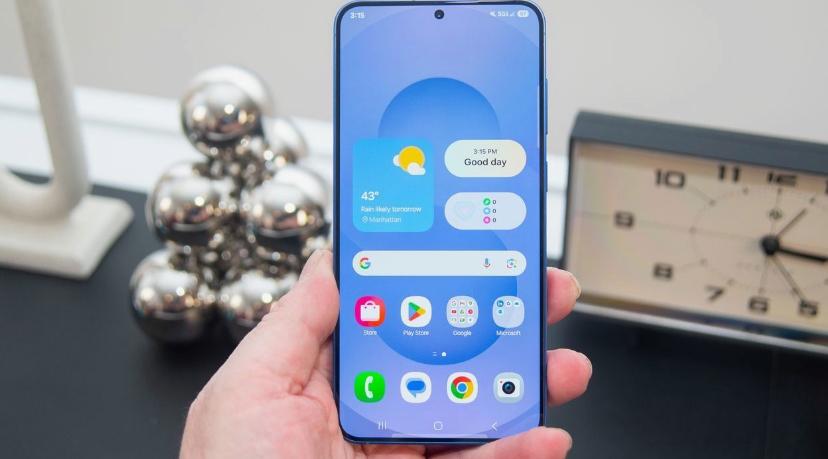
The devices featured in Samsung’s latest creative video include the Galaxy Tab S11 series, Z Fold 7 and Z Flip 7, as well as the S25 series. One UI 8 expands the latest experiences to select older phones and tablets with updates. Samsung’s video highlights plenty of AI-powered features, including Google’s Gemini Live, Gallery Search, Generative Edit, Gemini Screen Share, Audio Eraser, Quick Share, Now Bar, Now Brief, Writing Assist, and Samsung Knox. Samsung One UI 8 gets its victory lap
Samsung One UI 8: A Smarter, Faster, and More Connected Experience
Samsung’s One UI 8 represents one of the biggest leaps in the company’s software experience, combining highly capable artificial intelligence with smoother performance and a more refined design. With deeper Google Gemini integration, upgraded multimedia tools, and improved personalization, One UI 8 delivers a truly modern smartphone experience. Below is an expanded look at the standout features powering this new update.
Google Gemini Live Integration
One UI 8 brings a tighter synergy between Samsung’s ecosystem and Google’s AI, led by the new Gemini Live feature. Acting as a real-time conversational assistant, Gemini Live helps users complete tasks, get information, or troubleshoot situations using contextual understanding. Samsung users also gain the ability to set the power button as a dedicated shortcut for launching Gemini instantly—turning the assistant into a central part of daily phone interactions.
Smarter Gallery Search
Samsung Gallery now boasts AI-enhanced search capabilities that feel more intuitive than ever. Instead of relying on rigid keywords, users can now search using natural language. You can describe an image scenario—like “photos of me at the beach in 2022” or “pictures with red flowers”—and the Gallery will locate the most relevant matches. This makes organizing and retrieving photos drastically simpler.
Supercharged Generative Edit
The Generative Edit tool receives a major upgrade with One UI 8, offering faster processing and more precise results. Whether you want to erase objects, reposition elements, or enhance image details, the improved engine delivers cleaner outputs with less waiting time. Samsung has optimized the AI workflow so edits feel fluid and effortless.
Google Gemini Screen Share
One of the most underrated but powerful additions is Gemini’s Screen Share function. Users can share their screen—or activate their camera—to show Gemini exactly what they are seeing. This enhances troubleshooting, product support, and real-time guidance, enabling the assistant to give more accurate answers by visual context rather than text alone.
Enhanced Audio Eraser
Audio Eraser receives a performance boost, making it faster and more effective at removing unwanted background noise from videos. A new quick toggle in the Gallery’s viewfinder makes the feature easier to access, giving content creators and casual users a cleaner audio result without complicated editing tools.
Revamped Quick Share
Quick Share remains a fan favorite for effortless file transfers, but One UI 8 improves it further with a refreshed interface. The updated design makes sending documents, photos, or videos smoother, more intuitive, and visually appealing.
Improved Now Bar and Now Brief
Android 16 strengthens Samsung’s Now Bar with better real-time alerts and expanded app compatibility. Meanwhile, Now Brief has evolved into a smarter content hub, recommending longer videos that match your interests. The newly added Nano Banana-powered AI image generator gives users creative tools right inside their briefing feed.
Writing Assist and Samsung Knox
Writing Assist helps refine your writing tone—be it casual, formal, or creative—giving your content a polished finish. On the security front, Samsung Knox continues to safeguard user data, ensuring AI-powered features remain private and protected.
About the Author